
How to Create a My Social Security Account (MySSA)A Step-by-Step Guide
A “my Social Security” (MySSA) account is a secure online portal provided by the Social Security Administration (SSA). It allows you to manage important aspects of your benefits without visiting an office or waiting on hold.
With a MySSA account, you can:
- Check the status of a disability claim or appeal
- Review your Social Security earnings record
- Estimate future benefits
- Update personal information and direct deposit details
- Access important notices from the SSA
For individuals applying for or receiving SSDI, having access to this account can make the process faster, more transparent, and easier to manage.
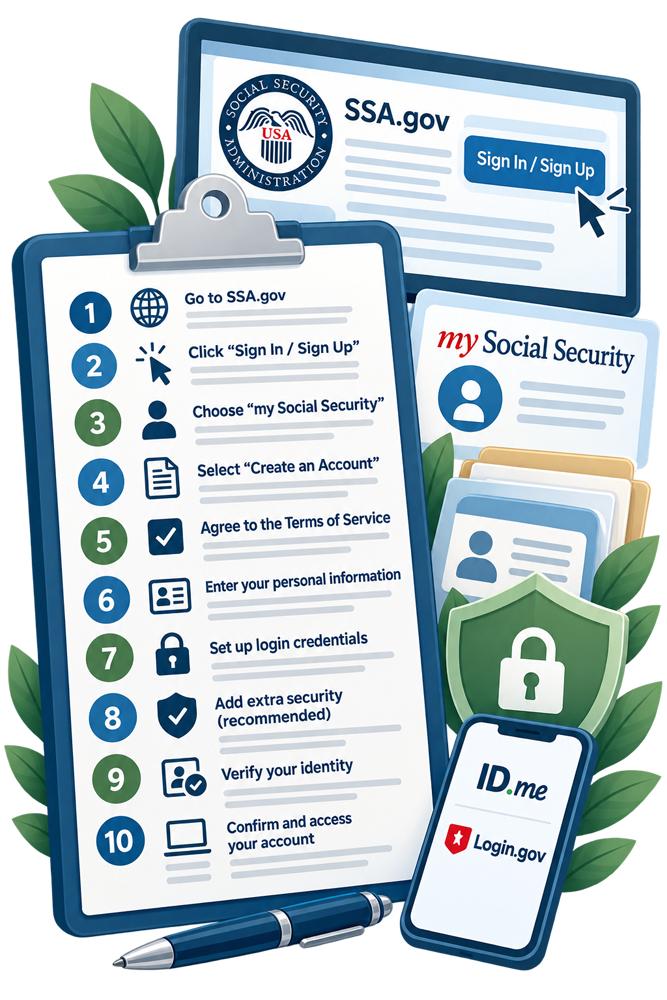
Step-by-Step: Creating Your MySSA Account
Setting up your account typically takes about 10–15 minutes. Here is how to do it based on the current SSA.gov process:
- Go to the official SSA website
Visit www.ssa.gov using a secure internet connection. Always make sure you are on the official government site before entering personal information. - Click “Sign In / Sign Up”
On the homepage, look for the “Sign In / Sign Up” button in the upper-right corner. This will take you to the account access page. - Choose “my Social Security”
You will see options for different services. Select “my Social Security” to proceed to the account login and registration area. - Select “Create an Account”
Scroll down and click the option to create a new account. If you already have Login.gov or ID.me credentials, you may be prompted to use one of those services instead, as SSA has integrated with secure sign-in partners. - Agree to the Terms of Service
Carefully review SSA’s Terms of Service. Once you are ready, check the box indicating your agreement and click “Next” to continue. - Enter your personal information
You will be asked to provide basic identifying details such as your name, Social Security number, date of birth, address, and email. Make sure everything matches your official records to avoid delays. - Set up login credentials
Create a username and password. Choose a strong password that includes a mix of letters, numbers, and symbols to keep your account secure. Be sure to record your login credentials including your password somewhere secure where you will be able to find it again should you need it. - Add extra security (recommended)
You will have the option to enable two-factor authentication. This adds an extra layer of protection by sending a code to your email or phone each time you log in. While you can choose “Maybe later,” enabling this feature is strongly recommended. - Verify your identity
The SSA may ask additional questions or use a partner service like Login.gov or ID.me to confirm your identity. This step helps protect your personal and financial information. - Confirm and access your account
Once your information is verified, your account will be created. You can log in immediately and begin using your dashboard.
Troubleshooting Common Issues
Even with a straightforward process, some users run into problems. Here are a few common issues and how to handle them:
Forgot username or password
Use the “Forgot Username” or “Forgot Password” links on the login page. You will need access to your email and may need to answer security questions. You can also easily change your password if necessary, and be sure to record the new password somewhere secure.
Identity verification problems
If the system cannot verify your identity online, you may be asked to complete additional steps, such as uploading identification documents or visiting a local Social Security office. If you are unsure where your local Social Security office is, simply visit https://www.ssa.gov/locator and enter your ZIP code.
Account locked
Too many failed login attempts can temporarily lock your account. Wait the required time or follow the instructions provided to reset your access.
Two-factor authentication issues
If you are not receiving your security code, check your spam folder, confirm your contact information, or choose an alternate verification method if available.
Tips for a Smooth Setup
To avoid delays, gather your information before you begin. Make sure you:
- Use a secure and private internet connection
- Have access to your email and phone
- Enter information exactly as it appears on official documents
- Keep your login details in a safe place
Taking a few extra minutes to set up your account properly can save time and frustration later.
How Spector & Lenz Can Help
While creating a MySSA account is a helpful first step, understanding your benefits and navigating the SSDI process can still be complex. If you are applying for benefits, appealing a denial, or unsure what to do next, having guidance can make a meaningful difference.
At Spector & Lenz, our Chicago disability attorneys help clients across the country understand their options, avoid common mistakes, and move their claims forward with confidence.
Get Started Today
Creating your MySSA account gives you direct access to important information about your benefits and claim status. It is a simple but powerful tool that can help you stay informed and in control.
If you have questions about your SSDI claim or need legal guidance, contact Spector & Lenz today to schedule a consultation.
Disclaimer
The information you obtain at this site is not, nor is it intended to be, legal advice. You should consult an attorney for advice regarding your individual situation. We invite you to contact us and welcome your calls, letters and electronic mail. Contacting us does not create an attorney-client relationship. Please do not send any confidential information to us until such time as an attorney-client relationship has been established.